Summary or illumination of trouble-shooting items covered earlier
- Whenever possible, run the ported program under xterm, with the command-line switches "+sb -tn linux".
- Functions needed by Turbo C may not have been provided in the TurboC library function list. Solution: Write them and send them to me.
- Integer datatypes may not have been converted properly. Solution: Handle as described earlier.
- Some functions, such as strupr, strlwr, and fcloseall are not handled by any of the Turbo C header files. Solution: #include
. - The TurboC library cannot physically resize the console unless the ported program is being run under xterm. Solution: Manually resize the console, rewrite the code to adjust automatically to size changes, or send me a fix.
- The ported program does not release control of the console on exit. Solution: Add a call to textmode(EXITMODE) before exiting the program.
- Functions don't behave as expected. Quite a few functions are common to Turbo C and to gcc, but act somewhat differently. An example is printf. In gcc this supports the carriage-return character ('\r'), but in true Turbo C does not. I've chosen not to correct this. Other functions, like getch , ungetch, and mkdir, are different enough that I've had to correct for their differences. Typically this is done by means of macros, so that these functions have their gcc interpretations above the point in the source file where their associated header files are included, and have their Turbo C interpretations below that point. Solution: Learn to recognize it, I guess. The gcc functions are always available, even after macro assignment, by means of a new name, such as getchNcurses.
- Not all special-function keys on the keyboard are supported. Solution: Rewrite the code to eliminate the keys that aren't supported, or send me a fix .
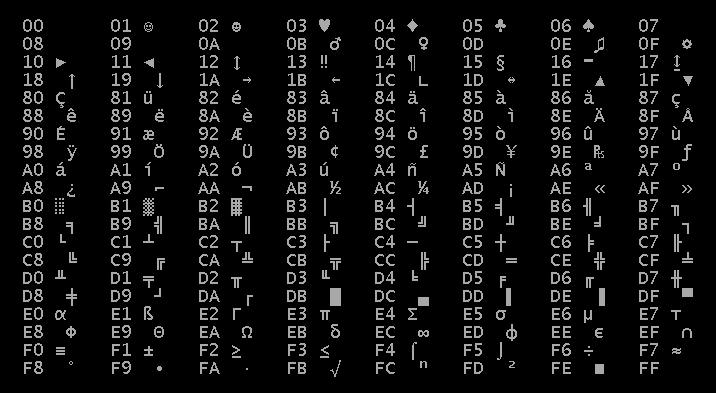
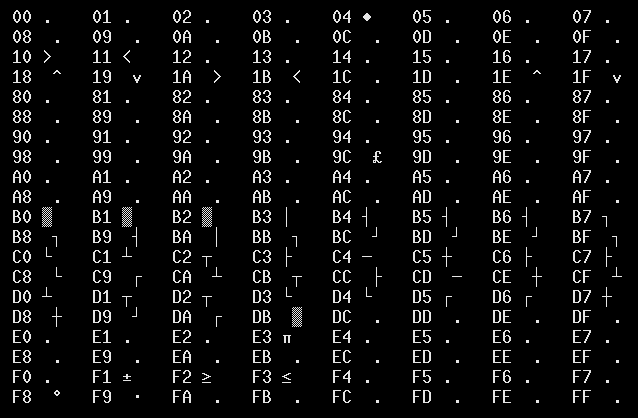
- Not all graphics characters are supported in console i/o mode (cprintf/putch/etc.), and none of them are supported in regular text mode (printf/putchar /etc.). Solution: Rewrite the code to eliminate those characters, or send me a fix.
- char is signed but is supposed to be unsigned (or vice versa). Solution: Both Turbo C and gcc have options/switches for setting whether characters are signed or unsigned by default. Make sure you set the switch in gcc the same way as the option in Turbo C.
- Main function is of the wrong type. The gcc compiler expects main to be of type int, whereas in Turbo C these are often (always?) of type void. Solution: Change it.
- You may experience some compiler errors if integer datatype conversion is turned on but a compiler optimization level higher than -O0 is used when compiling your code. Solution: reduce the optimization level to -O0 and report the problem. This applies only to compiling your own code, and not to building the TurboC library.
- Allocating the image buffers for the getimage function: The proper sequence of operations, as defined by Borland's docs, is this:
- Manipulation of the image buffers used by the getimage and putimage functions: Borland does not specify the format of the data in the image-buffer structures used by the getimage and putimage functions. (See the item above.) All that is specified is that this:
- Saving getimage image buffers to disk, or loading putimage image buffers from disk: If you read the discussion above, it will be obvious to you that this is next-to-useless, since the image buffers themselves no longer contain graphical data. What needs to be save or loaded is the Pixmap structures themselves, whereas the image buffers contain only the handles of the Pixmap structures. I believe that it is possible to get around this problem by rewriting the getimage /putimage functions in terms of the X-window functions XGetImage and XPutImage rather than Pixmap structures. If you want to do this and send me the patches, tell me about it.
- // Good code, approved by Borland and by the TurboC library.
void MyFunction (void)
{
void *bitmap;
bitmap = farmalloc (imagesize (left, top, right, bottom));
getimage (left, top, right, bottom, bitmap);
... do stuff, such as call the putimage function ...
farfree (bitmap);
return;
}
- // Bad code, by any standards.
void MyFunction (void)
{
char bitmap[4 + X_SIZE * Y_SIZE * COLOR_DEPTH];
getimage (left, top, left + X_SIZE - 1, top + Y_SIZE - 1, bitmap);
... do stuff, such as call the putimage function ...
return;
}
- struct {
unsigned short width;
unsigned short height;
... some undocumented stuff representing graphical data ...
};
- struct TcImageBuffer
{
gushort Width;
gushort Height;
Pixmap Handle;
};
- Various standard C library "functions" may actually be implemented as macros on some target platforms, and as true functions on others. A common example is strcpy. When such macros contain casts (such as "(unsigned int)") that are questionable as described above under handling of integer datatypes, code containing them will fail to compile. It's difficult for me to catch all of these, since they may be perfectly fine on my test machines. For clues as to how to work around such problems, look at the implementation of strcpy in TurboC.h. Sometimes, changing the compiler optimization level to "-O0" fixes the problem. Or, just don't use the automatic datatype conversion.
- Header files are messed up. The TurboC header files all include TurboC.h, which by default redefines short, int, unsigned , and long. Solution: Any standard system headers, must be included before any TurboC header, or else the reassignments of the integer datatypes will destroy them. Actually, TurboC.h itself includes a variety of standard system headers -- like stdlib.h, stdio.h, string.h, ctype.h, and so on -- and this problem won't arise for those headers. But your typical *nix system has a cadjillion header files, and TurboC.h can't include them all.
- Filenames don't work in fopen. MS-DOS expected filenames like C:\MYDIR\MY.FIL, whereas *nix expects names like /MYDIR/MY.FIL. Also, *nix is case-sensitive, whereas MS-DOS is not. So if you have any hardcoded filenames that violate these rules, you'll have to fix them. I suppose I could have fixed fopen to get around some of these problems, but I have not done so.
- scanf/gets/getchar doesn't work. In Turbo C, to a certain extent you can get away with mixing and matching getchar & getch or cgets & gets. This doesn't work with the TurboC library because once the conio text console is active you can't use scanf/gets/getchar until closing the conio console. Solution: Rewrite the code to eliminate gets/getchar in favor of cgets/getch (or vice versa). But note this: In my experience, a large motivator for using conio was often simply that Turbo C's print/putsgcc 'sprintf/puts functions do correctly support '\r', so you might not even need conio. functions did not correctly support '\r'.
- The compiler gives weird errors for printf/scanf/(etc.) commands. The gcc compiler is intelligent enough to find many discrepancies between format strings and value lists in printf statements. For example, it can recognize that this is an error:
- printf/scanf/(etc.) don't work, but there's no compiler error. See the item above.
- File i/o is messed up. File i/o is not messed up, but since different datatypes are supported in Turbo C than in gcc/TurboC, the data formats you're reading/writing may be different. This can happen in numerous ways:
- Integer datatypes are the wrong size.
- Integer datatypes are the wrong endian type.
- printf/scanf/(etc.) may use the wrong format strings (see above).
- Floating-point formats differ. Sorry, but I've no clue about this.
- Structures are packed differently. For example, a structure like this in Turbo C
- Interrupt service routines. Sorry, I don't even want to think about this.
- Inline assembler code. It can be done, but I don't know how, and the syntax will be different. I personally don't care about this problem, because I'm interested only in completely portable code. Sorry!
- Making DOS or BIOS system calls. Obviously, you can't.
- Turbo C pragmas. These will get warning messages from the compiler, but will be otherwise ignored. But they're confusing, so unless you expect to go back to MS-DOS someday, I'd suggest removing them manually. :-)
- long n; // a long
printf ("%d\n", n); // an int
- uint32_t n; // a long
printf ("%ld\n", n); // a long
- int n; // 16-bits
printf ("%d\n", n); // 16-bit in Turbo C but 32-bit in gcc.
- struct MyStruct {
char c;
short s;
int i;
long n;
};
- struct MyStruct {
int8_t c __attribute__ ((packed));
int16_t s __attribute__ ((packed));
int16_t i __attribute__ ((packed));
int32_t n __attribute__ ((packed));
};